
If you’re a RevOps leader or SaaS marketer, you already know this paradox: HubSpot is incredibly powerful, and yet setting up lead scoring often feels harder than it should be. The documentation is thorough, but also can be overwhelming. Blog posts explain what lead scoring is, list dozens of possible properties, and then quietly leave you alone with a blank score field and a lot of unanswered questions. What they rarely tell you is how to design a lead scoring setup that actually works for a scaling SaaS business.
This blog is different. Instead of another long tour of HubSpot features, this is an actionable playbook for how to set up lead scoring in HubSpot built specifically for SaaS teams. The goal is to have a scoring model that helps sales focus, marketing prioritize, and RevOps scale without constant manual intervention.
Most guides jump straight into tactics: which properties to score, how many points to assign, and where to click in HubSpot. We’ll take the opposite approach. We start with a strategy, the “why”, before touching the “how.” Because without clear alignment on what actually signals buying intent in your SaaS business, even the most sophisticated HubSpot lead scoring setup will fail.
By the end of this guide, you’ll know how to:
- Align sales and marketing around what a “good lead” really means for your SaaS motion
- Identify high-impact SaaS signals worth scoring (including Product Qualified Leads, not just MQLs)
- Design a simple, scalable, and automated HubSpot lead scoring model from scratch, without over engineering
If your current scoring feels arbitrary, ignored by sales, or impossible to maintain as you scale, you’re in the right place.
Plan Before You Build: The SaaS Lead Scoring Strategy Framework
HubSpot’s documentation (and many community answers) are excellent at explaining how to configure scores: which menus to click, how positive and negative points work, and how to combine multiple criteria. What they rarely address is the strategic groundwork that makes those rules meaningful in the first place.
Here’s the hard truth:
A successful HubSpot lead scoring setup is 80% strategy and only 20% tool configuration.
If you skip the strategy, you end up with a score that looks sophisticated but drives no behavior:
- Sales ignores it because it doesn’t match their reality
- Marketing keeps tweaking points without knowing what “good” actually means
- RevOps becomes the referee in endless MQL vs. SQL debates
This framework is designed to prevent that. Before you build a single rule in HubSpot, you’ll align sales and marketing on what matters, why it matters, and when a lead should change hands. That alignment is what turns lead scoring from a technical exercise into a revenue lever.

Define Your Tiers: Aligning on MQL vs. SQL vs. PQL
Before assigning points, you need shared language. In B2B SaaS, lead scoring only works when everyone agrees on what each lifecycle tier represents, and what it does not represent.
Here are clear, practical definitions in a SaaS context:
- Marketing Qualified Lead (MQL)
A lead that has shown meaningful engagement with your marketing and fits your ICP, but is not yet sales-ready. - Sales Qualified Lead (SQL)
A lead that sales has reviewed and confirmed as worthy of direct follow-up, based on intent, fit, and timing. - Product Qualified Lead (PQL)
A lead or account that has demonstrated strong buying intent through product usage, typically in a free trial or freemium model.
To make these differences tangible, use a comparison table like the one below and review it live with both teams.
|
Lead Tier |
Typical Triggers |
Primary Owner |
Main Goal |
|
MQL |
Content engagement, form fills, repeated website visits, ICP fit |
Marketing |
Identify and nurture potential buyers |
|
SQL |
Demo request, sales qualification call, explicit buying intent |
Sales |
Convert qualified interest into pipeline |
|
PQL |
Trial activation, feature usage milestones, inviting teammates |
Product / RevOps / Sales |
Accelerate conversion from product to revenue |
The most important step here isn’t the table, it's a documented sign-off.
Get explicit approval from sales and marketing leadership on these definitions. Put them in writing. This single action will save you months of friction later when leads start flowing and questions arise.
Identify Your High-Impact Conversion Signals
Once tiers are clear, the next question is simple, but often skipped:
What actions actually predict conversion in your SaaS business?
Instead of guessing or copying generic lists, run this quick exercise:
Look at your last 20 closed-won customers.
Review their activity history in HubSpot.
What were the final 3–5 actions they took before talking to sales?
Patterns will emerge fast. Those patterns, not vanity engagement, are what your lead scoring model should prioritize.
If you’re on Marketing Hub Enterprise, HubSpot’s AI Score can surface recommended signals based on historical conversion data. It’s a powerful accelerator, but it works best when guided by a clear understanding of which behaviors truly drive revenue in your SaaS.
To get you started, here are common high-impact SaaS conversion signals you may recognize:
- Visited the pricing page multiple times
- Started a free trial
- Activated a key feature during the trial
- Invited a teammate or added users
- Requested a demo or pricing information
- Returned to the app repeatedly within a short timeframe
- Reached a usage threshold tied to value realization
Not every signal deserves points, and not every point should be equal. The goal at this stage isn’t scoring yet; it’s prioritization. Once you’ve identified the signals that truly correlate with revenue, you’re ready to translate strategy into a clean, scalable HubSpot lead scoring setup.
How to Set Up Lead Scoring in HubSpot: A Step-by-Step Guide
Now it’s time to translate strategy into execution.
Everything you defined in the previous section, lead tiers, conversion signals, and ownership, feeds directly into this setup. Think of this part as the mechanical implementation of decisions you’ve already made, not a place to improvise or experiment.
Below is a simple walkthrough of how to set up lead scoring in HubSpot, using the current UI. You can follow this step-by-step with HubSpot open on another screen.
Creating Your Combined Score Property for Contacts and Companies
This is the foundation of your entire HubSpot lead scoring setup.
Step 1: Navigate to Lead Scoring
- In the top navigation, go to Marketing
- Click Lead Scoring
- Select Create score
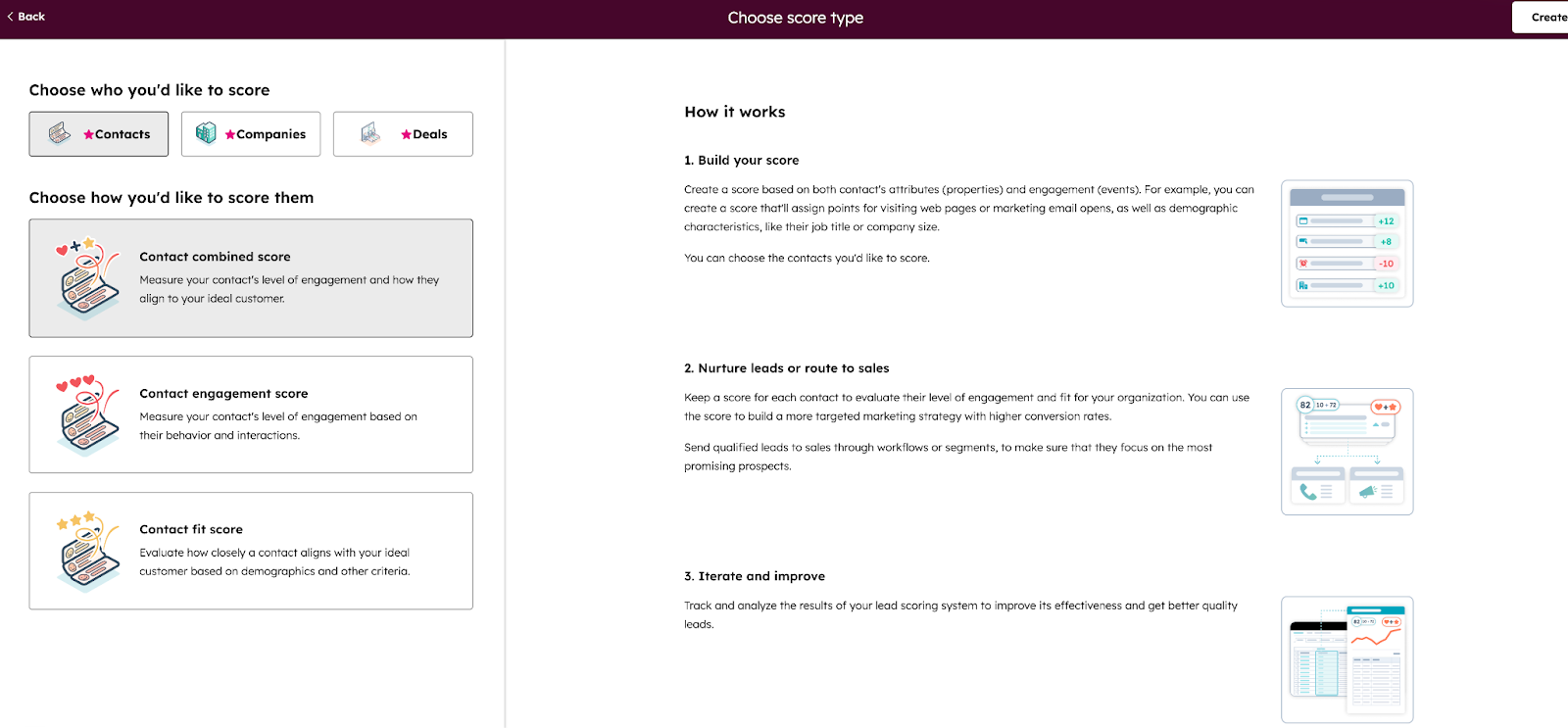
Step 2: Choose the Correct Score Type
HubSpot will prompt you to select a score type. This choice matters.
Select: Combined score
Why? Because a Combined score allows you to:
- Score fit (company size, industry, role, geography)
- Score engagement (page views, form fills, product actions)
- Apply logic across contacts and companies, which is critical for B2B SaaS buying committees
This is the most flexible and future-proof option for a SaaS model, especially if you plan to incorporate PQL signals later.
Step 3: Name and Assign the Score
- Name your score clearly (for example: SaaS Lead Score – Combined)
- Apply it to:
- Contacts, and
- Companies (recommended for account-based SaaS motions)
Click Create to enter the scoring builder.
Configuring Score Groups, Limits, and Decay
This is where many HubSpot lead scoring setups quietly go wrong, not because of bad signals, but because of missing guardrails.
Use Score Groups to Stay Organized
Score groups help structure your model and make it readable months later.
Recommended starting groups for SaaS:
- Profile Fit (role, company size, industry)
- Marketing Engagement (content, site activity)
- Product Signals (trial usage, feature adoption)
- Sales Intent (demo requests, pricing views)
Each group should answer one question: Why does this action or attribute matter?
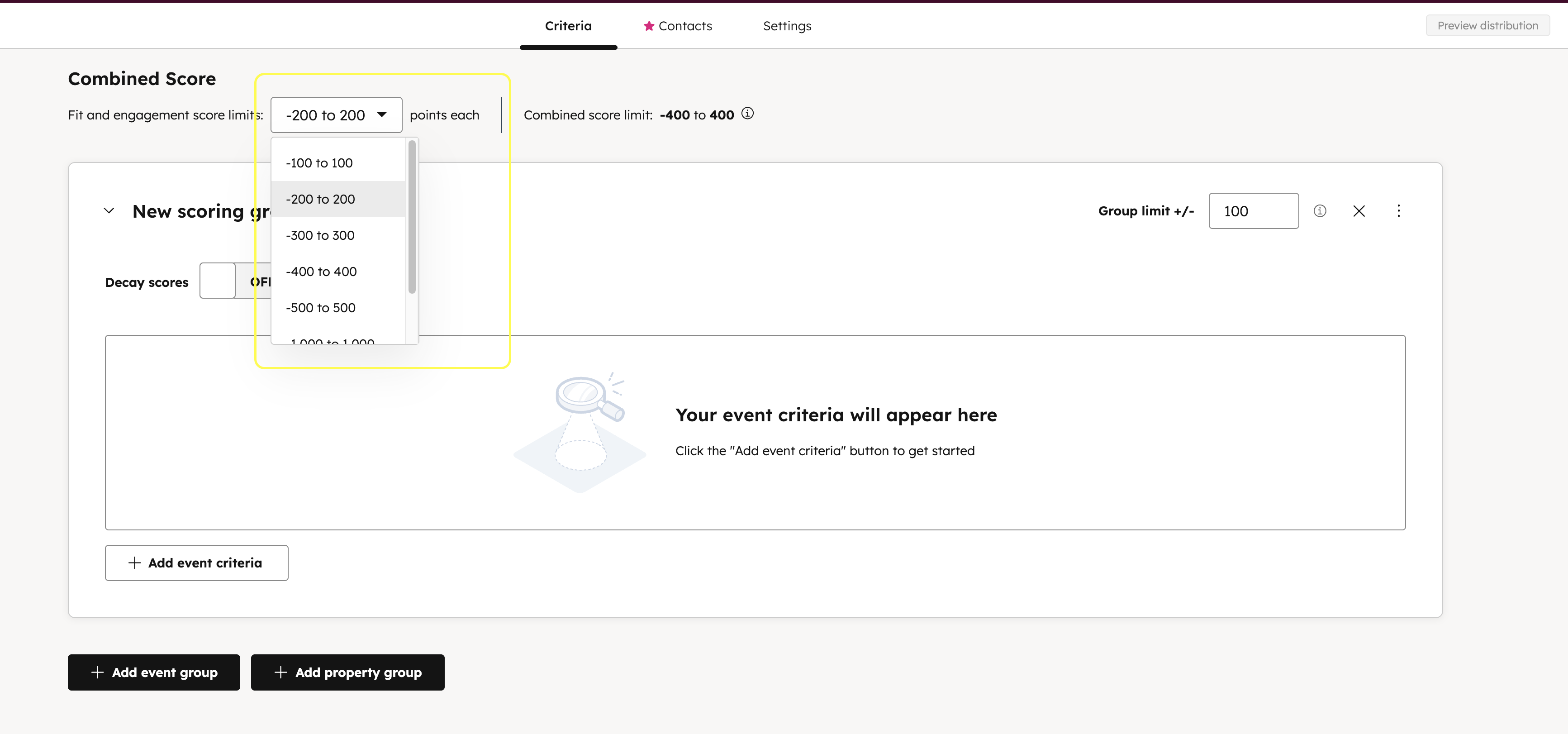
Set a Score Limit to Prevent Inflation
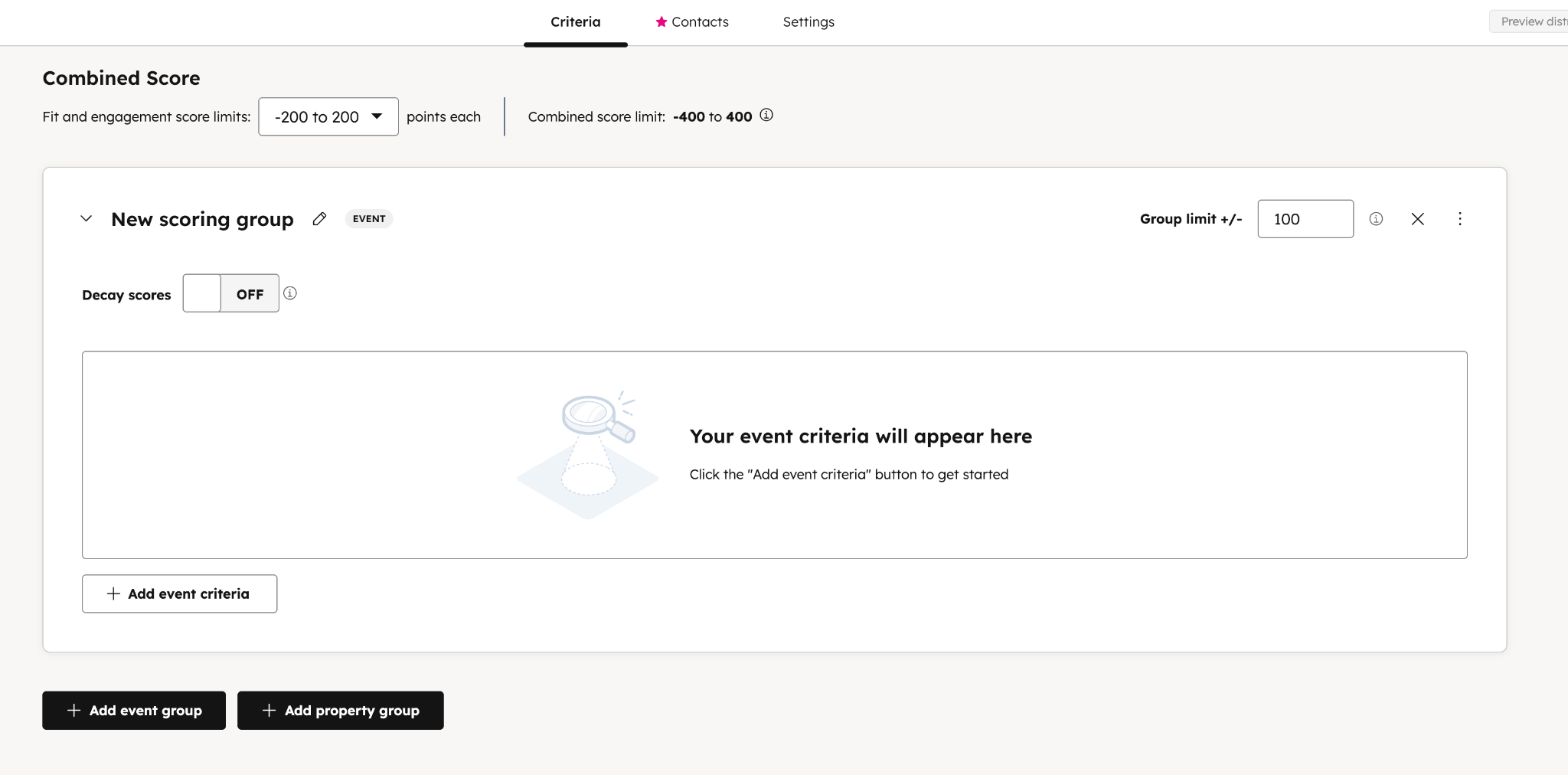
Without limits, low-value actions (like repeated email opens) can artificially inflate scores.
Best practice:
👉 Start with a score limit of 100
This keeps your score interpretable and forces prioritization of high-impact signals.
To set this:
- In the score settings panel
- Find Score limit
- Select 100
 Enable Score Decay to Prioritize Recent Intent
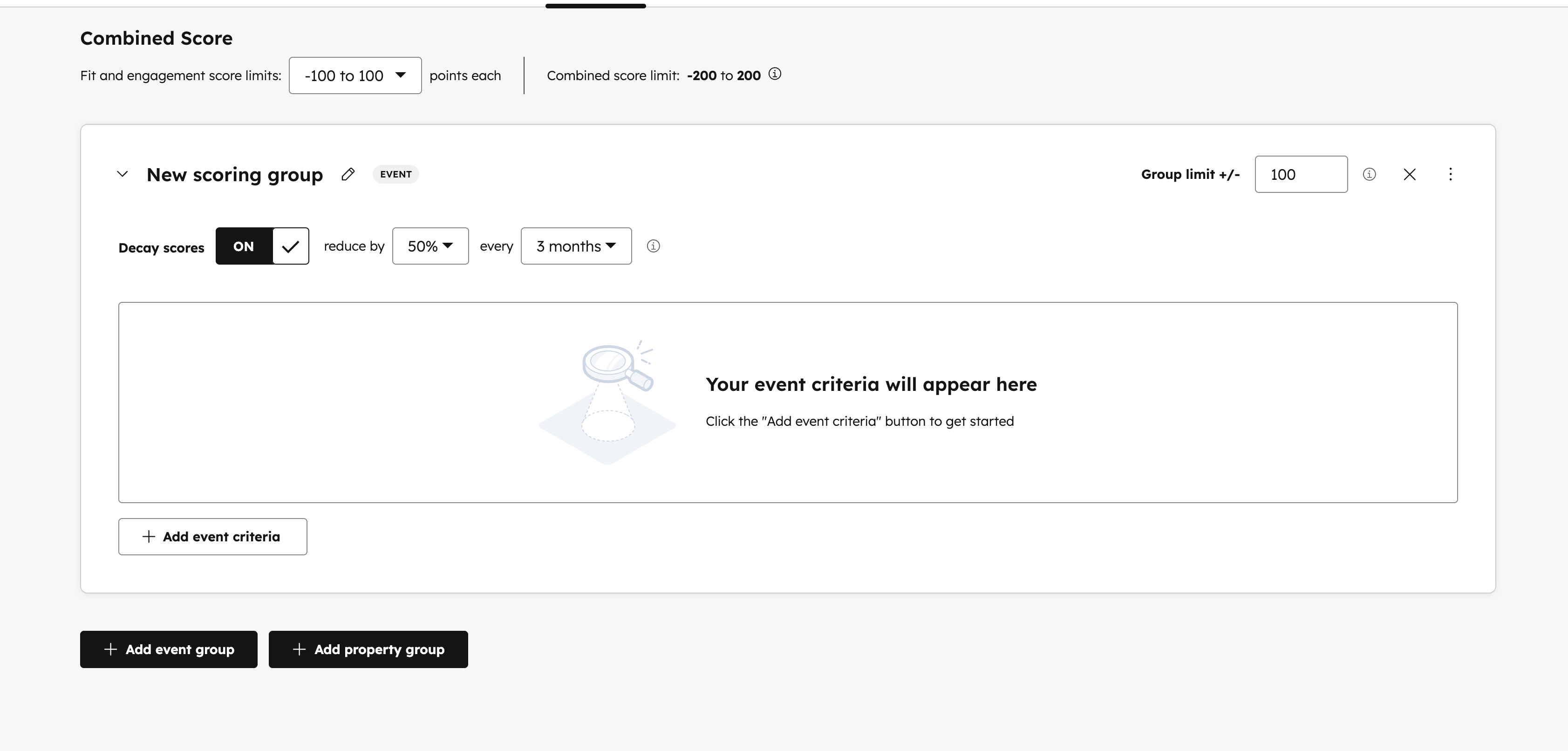
Intent expires. A pricing page visit six months ago should not outweigh meaningful recent activity.
Our recommendation:
👉 Enable Score decay
👉 Reduce points by 50% every 90 days
This keeps your HubSpot lead scoring setup aligned with current buying signals, not historical noise.
To enable decay:
- Toggle Decay scores
- Set the decay interval and percentage
At this point, you’ve:
- Created a Combined score aligned with SaaS buying behavior
- Structured it for long-term clarity
- Put guardrails in place to keep scores meaningful over time
Next, the real leverage comes from assigning the right weights to the right signals, especially when balancing MQL, SQL, and PQL behavior inside the same model.
The SaaS Playbook: Building Your Scoring Criteria
This is where your HubSpot lead scoring setup actually comes to life.
Up to now, you’ve defined what matters and why. This section turns that strategy into concrete scoring rules inside HubSpot, the criteria, point values, and logic that determine who gets attention and when.
Before touching the UI, pause for one critical step that most teams skip:
Create a simple spreadsheet first.
Your spreadsheet should include:
- The criterion (what you’re scoring)
- The HubSpot property or event
- The point value
- The reason it matters
This does two things:
- It forces clarity and alignment before configuration
- It gives you a single source of truth when sales inevitably asks, “Why did this lead score so high?”
A quick principle to anchor everything
Not all actions are equal.
High-intent behaviors should be weighted far more heavily than passive engagement.
A demo request is not just “another action.” It’s a buying signal.
A blog view is useful, but it’s early, exploratory intent.
Your scoring model should reflect that reality.
Fit Criteria: Scoring Firmographics and Demographics
Fit criteria answer one question:
How closely does this lead match your Ideal Customer Profile (ICP)?
In HubSpot, these rules typically rely on contact and company properties like job title, industry, and company size. They don’t indicate readiness to buy, but they determine whether a lead is worth pursuing at all.
Below is a sample table of positive Fit criteria for a typical B2B SaaS ICP. Point values should reflect the relative importance of each criterion, with higher-impact signals weighted proportionally higher.
|
Criteria |
HubSpot Property |
Points |
|---|---|---|
|
Job Title contains Director, VP, Head |
Job Title |
+15 |
|
Industry is Technology |
Industry |
+10 |
|
Company Size is 51–200 employees |
Number of Employees |
+10 |
|
Company Size is 201–1,000 employees |
Number of Employees |
+15 |
|
Country is United States / EU |
Country |
+5 |
These criteria help quantify ICP alignment in a consistent, scalable way. A lead with strong engagement but poor fit should not outrank a high-fit lead showing moderate intent, and this is how you enforce that.
Engagement Criteria: Scoring High-Intent Website and Marketing Actions
Engagement criteria measure intent, what a lead is actively doing right now.
This is where your earlier planning exercise pays off. Use the conversion signals you identified from closed-won deals, not generic engagement for engagement’s sake.
Below is a sample table of high-intent SaaS engagement criteria:
|
Criteria |
HubSpot Property / Event |
Points |
|
Submitted Demo Request Form |
Form Submission |
+30 |
|
Visited Pricing Page in last 30 days |
Page View |
+15 |
|
Viewed 3+ Case Studies |
Page View Count |
+10 |
|
Attended a Product Webinar |
Event Attendance |
+15 |
|
Requested Pricing Information |
Form Submission |
+25 |
Notice the weighting: explicit buying actions dominate.
This ensures your HubSpot lead scoring setup surfaces leads who are actually evaluating, not just browsing.
PQL Signals: Scoring Product Usage and Trial Data
This is the key differentiator of a modern SaaS lead scoring model.
Product Qualified Leads (PQLs) are often your strongest buying signals, but they don’t exist in HubSpot by default. To score them, you’ll typically need:
- Custom properties
- Product usage data synced from analytics tools like Mixpanel, Segment, or Amplitude through direct integrations with HubSpot.
- Or lifecycle events pushed into HubSpot
Yes, it requires setup, but the payoff is massive.
Here’s a sample table of PQL signals with example point values:
|
PQL Signal |
Data Source / Property |
Points |
|
Free Trial Started |
Lifecycle Event |
+20 |
|
Used [Key Activation Feature] |
Product Event |
+25 |
|
Invited 2+ Teammates |
Product Event |
+15 |
|
Logged in 5+ times in 7 days |
Product Usage Property |
+20 |
|
Approaching Usage Limit |
Custom Property |
+20 |
If you have a product-led motion, these signals should often outweigh marketing engagement entirely. A lightly engaged marketer who activated your core feature is more valuable than a perfectly nurtured ebook downloader.
Advanced Tactics: Using Negative Scoring to Disqualify Poor Fits
Negative scoring is not optional, it’s how you protect sales focus.
Without it, your pipeline fills with leads that technically “engaged” but should never have been prioritized in the first place.
Here are common SaaS-specific negative scoring rules to include:
- Email domain is gmail.com, yahoo.com, hotmail.com (−20 points)
- Job Title contains Intern, Student, Assistant (−50 points)
- Unsubscribed from all marketing emails (−15 points)
- Company is marked as Competitor (−100 points)
- Country outside supported regions (−25 points)
These rules keep your HubSpot lead scoring setup honest. They ensure high scores represent real revenue potential, not inflated activity.
At this stage, you should have:
- Clear fit, engagement, and PQL criteria
- Intent-weighted point values
- A scoring model that reflects how SaaS buyers actually convert
Next, the final step is making this operational – defining thresholds, triggering handoffs, and validating the model with real sales feedback before full rollout.
Putting Your Score to Work: Automation and Activation
A lead score on its own is just a number.
It only becomes valuable when it triggers an action like routing a lead, alerting sales, or changing how a contact is treated across the funnel. This is where many HubSpot lead scoring setups fall short: the model exists, but nothing meaningful happens when the score changes.
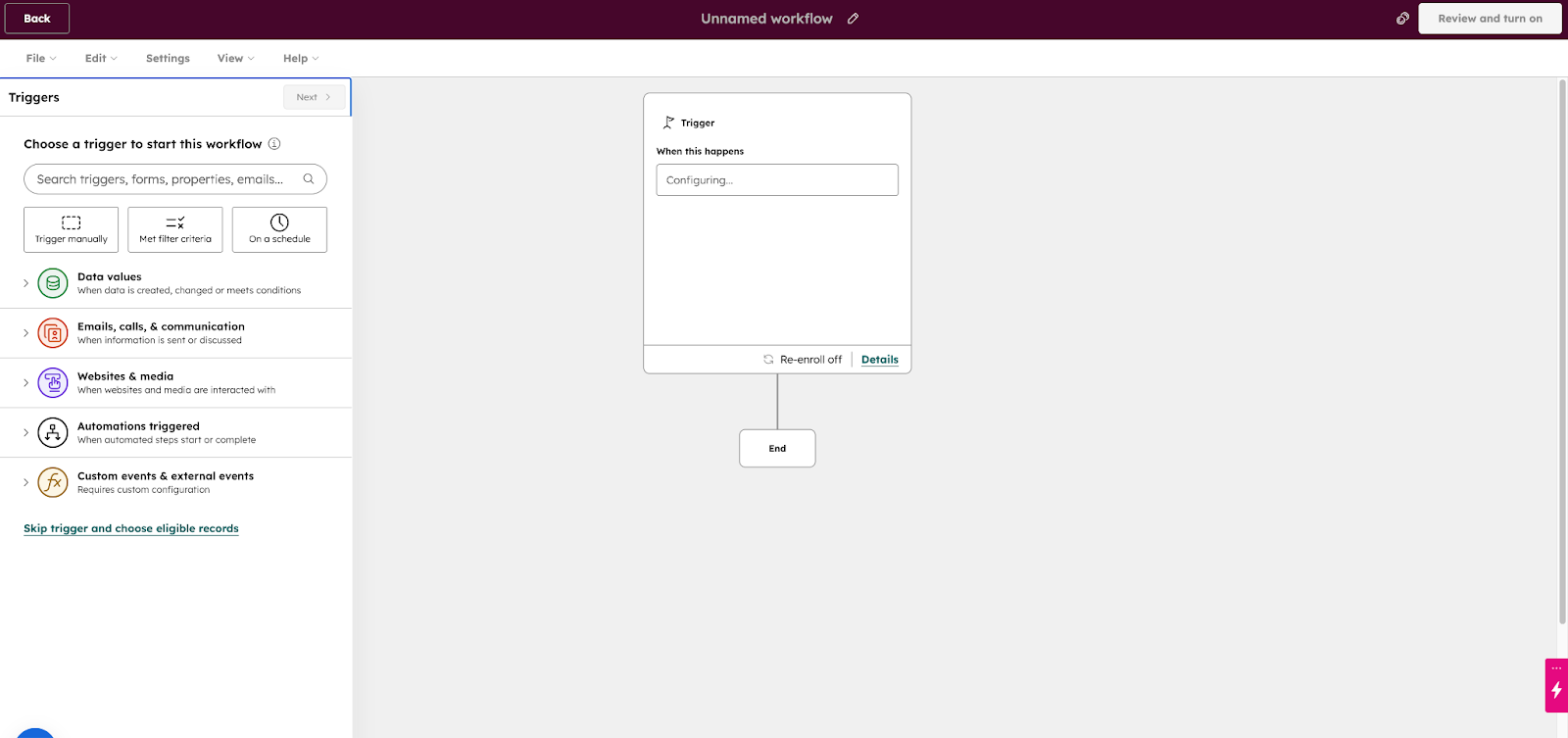
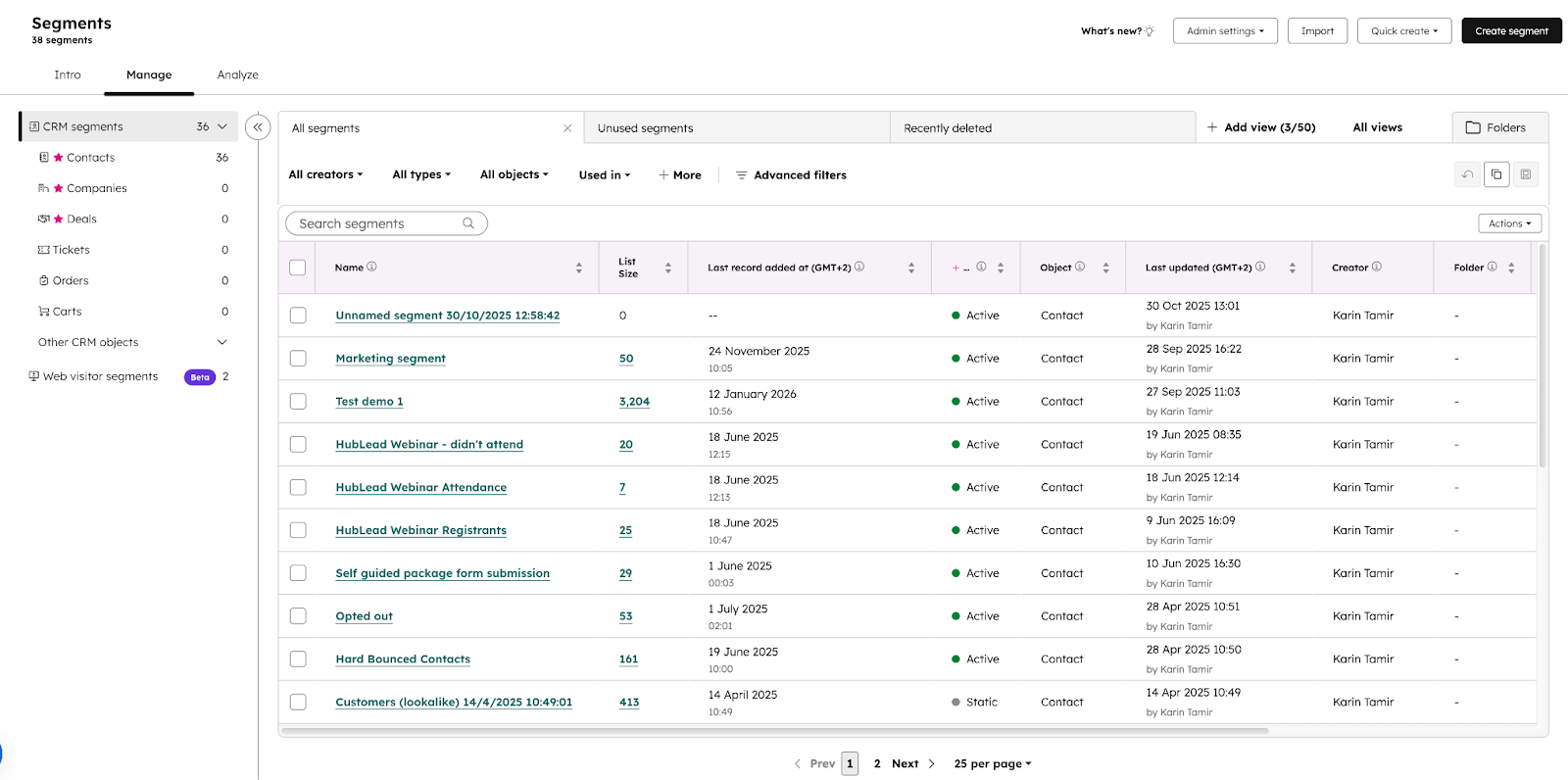
In this section, we’ll show how to operationalize your scoring model using HubSpot Lists and Workflows, so high-quality leads are surfaced automatically and sales never has to guess who to prioritize.
Setting Actionable Score Thresholds for Hand-offs
Before building workflows, you need clear thresholds that translate score ranges into ownership and expectations.
Here’s a simple, prescriptive framework that works well for most SaaS teams:
- 0–39 → Nurturing (Marketing-owned)
- 40–69 → MQL (Sales-aware, not yet actioned)
- 70+ → SQL (Sales-ready)
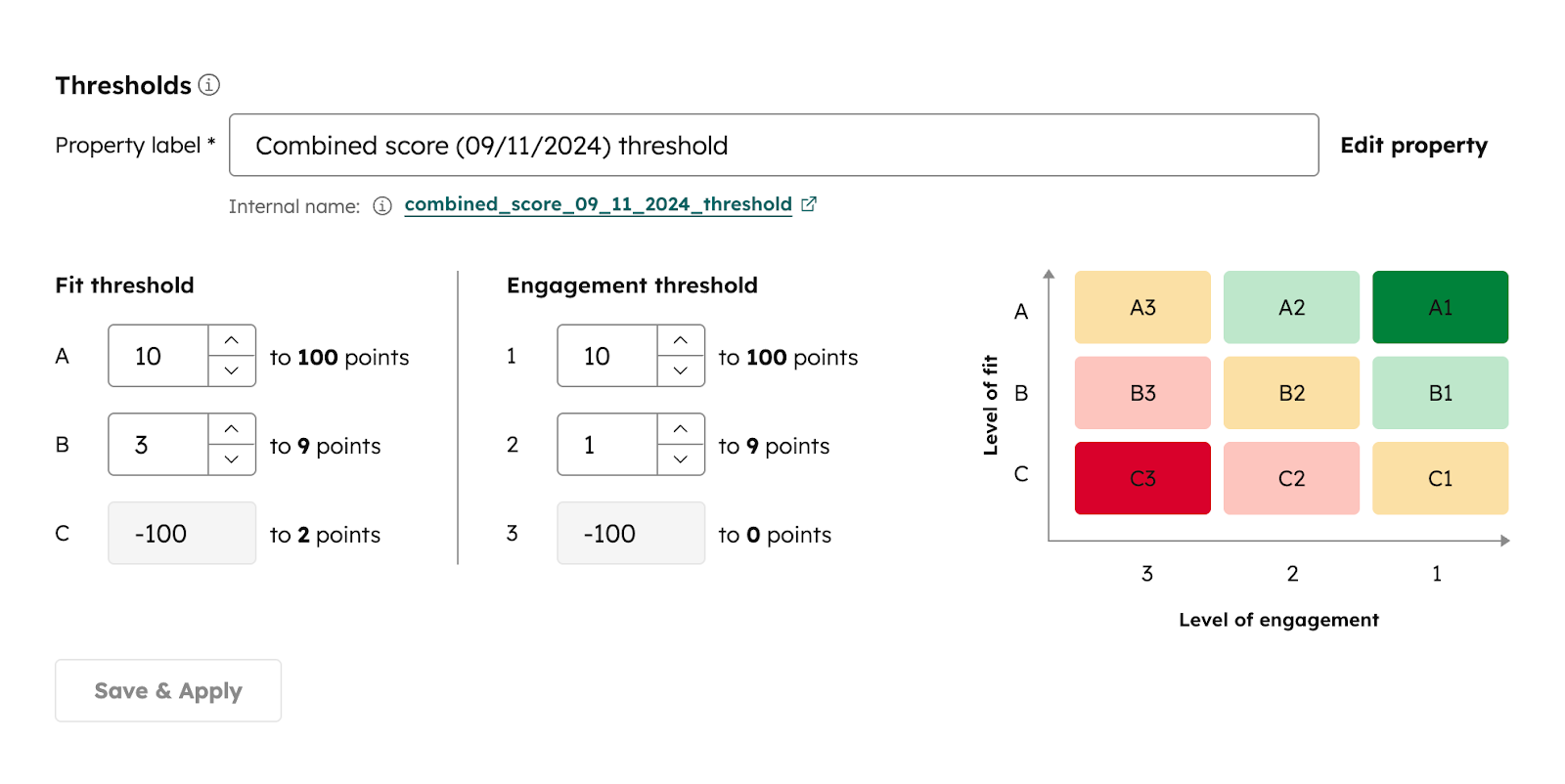
In HubSpot, you can define these directly inside your score settings using Score thresholds.
How to set thresholds in HubSpot
- Open your lead score
- Navigate to Score thresholds
- Define your ranges and labels (e.g., Low, Medium, High)
This creates a user-friendly property that sales can easily understand, without needing to interpret raw numbers.
Before activating:
- Use Preview distribution to see how your existing database would be categorized
- Sanity-check the results with sales (Are too many leads “High”? Too few?)
Creating Workflows to Route Qualified Leads Automatically
Once thresholds are in place, workflows do the heavy lifting.
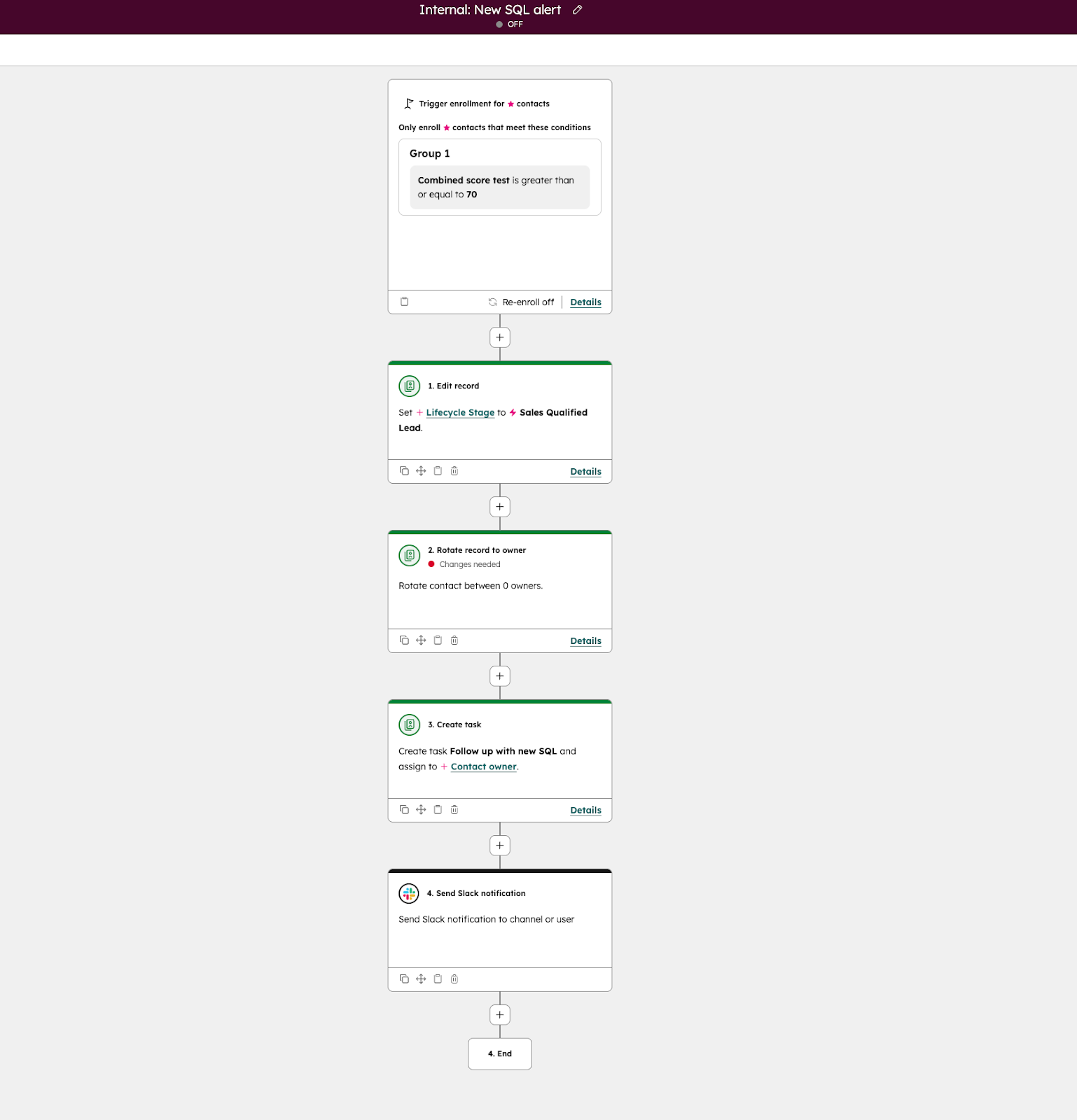
Below is a simple but powerful MQL → SQL hand-off workflow that operationalizes your scoring model.
Workflow recipe: MQL to SQL Hand-off
Enrollment trigger
Contact has reached a score of 70 or more
Workflow actions
- Set Lifecycle Stage to Sales Qualified Lead
- Rotate contact owner among sales reps
- Create a task for the new owner (e.g., “Follow up with new SQL”)
- Send an internal Slack or email notification to the assigned rep
This ensures:
- No manual hand-offs
- No delays
- No “I didn’t know this lead was hot” moments
Beyond “Set and Forget”: How to Audit and Evolve Your Scoring Model
This is where strong RevOps teams separate themselves from everyone else.
Lead scoring is not a one-time setup, it’s a living system that must evolve as your ICP, product, and go-to-market motion change. Ignoring this reality is how once-great models become irrelevant.
A simple quarterly audit checklist
Run this every quarter:
- Review MQL → SQL conversion rate
- Interview sales reps on lead quality and timing
- Analyze recent closed-won deals for new or stronger signals
- Check for score inflation and adjust limits, decay, or criteria
If sales feedback shifts or conversion rates drop, don’t tweak randomly. Instead, return to strategy, then update the model intentionally.
A Smarter Score for a Faster-Growing SaaS
A strong HubSpot lead scoring setup doesn’t start in the UI, it starts with alignment.
To recap:
- Plan your strategy before building anything
- Score what matters for SaaS: fit, engagement, and product usage
- Automate hand-offs so the score drives real action
- Audit and evolve the model as your business grows
When done right, lead scoring becomes a force multiplier. Sales focuses on the right conversations. Marketing prioritizes what converts. And revenue moves faster with less friction.
👉 Want help designing or auditing your HubSpot lead scoring model?
Book a RevOps consultation or explore our advanced HubSpot optimization services to turn your score into a real growth engine.
Frequently Asked Questions
How do I set up lead scoring in HubSpot?
At a high level:
- Align with sales on strategy and definitions
- Build your criteria inside HubSpot
- Automate hand-offs using workflows
To get started, navigate to Marketing → Lead Scoring in your HubSpot portal.
We recommend beginning with a Combined score to evaluate both fit (demographics) and engagement (actions).
For full click-by-click instructions, see the step-by-step setup section above.
What’s the real difference between scoring for an MQL, SQL, and PQL?
- MQL (Marketing Qualified Lead):
Score driven by marketing engagement (content downloads, webinars, site visits) - SQL (Sales Qualified Lead):
Score reflects strong ICP fit plus high-intent buying signals (pricing page, demo request) - PQL (Product Qualified Lead):
Score driven by in-product actions (trial start, feature usage, inviting teammates)
A mature HubSpot lead scoring setup combines signals from all three to create a holistic view of intent.
Do I need product usage data to get started with lead scoring?
No.
You can build a highly effective model today using only:
- Firmographics (fit)
- Website and marketing engagement (interest)
PQL scoring using product data is an advanced, high-impact evolution, not a prerequisite. Add it when your data and motion are ready.
Why is negative scoring so important for SaaS companies?
Negative scoring protects sales efficiency.
It filters out leads that may be active, but will never convert. Common SaaS examples include:
- Freemail domains (gmail.com, yahoo.com)
- Job titles like “intern” or “student”
- Long periods of product inactivity
Without negative scoring, pipelines get noisy and sales focus erodes.
How often should I audit my lead scoring model?
As a best practice, run a formal audit quarterly.
You should also review immediately if:
- Sales reports declining lead quality
- Your ICP changes
- Your GTM strategy shifts (e.g., PLG → sales-led)
A lead scoring model should evolve with the business, not sit untouched.